
How to Change Your Wi-Fi Password (Step by Step)
If your internet feels slow, someone else may be using it. An open or weak Wi-Fi password lets neighbours connect, eats your speed and can expose your devices to malware. Changing it takes about five minutes.
Before you start
- Use a phone or laptop that is connected to the router (Wi-Fi or cable).
- Find the router’s address and login on the sticker under the router.
- Remember: after you save, every device must reconnect with the new password.
Step-by-step
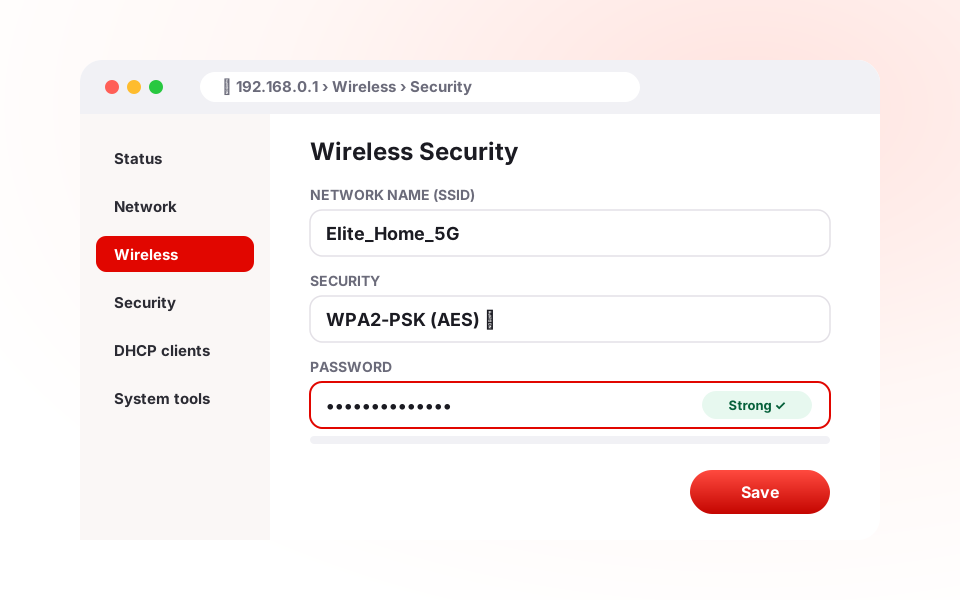
- Open the router page. Type the router address into your browser — usually
192.168.0.1,192.168.1.1or192.168.2.1. On Windows you can find it by runningipconfigand looking for “Default Gateway”. - Log in. Enter the admin username and password from the sticker (often “admin”). If you changed it and forgot it, a factory reset restores the default — but it also erases your settings, so call your ISP first.
- Open the wireless settings. Look for “Wireless”, “Wi-Fi” or “WLAN”.
- Choose the security type. Select WPA2-PSK (AES) or WPA3 if available. Avoid WEP — it is easy to break.
- Enter a new password. Use at least 12 characters with upper and lower case letters, numbers and a symbol. Avoid names, phone numbers and birthdays.
- Optional: rename the network. Pick a name that does not reveal your flat number or family name.
- Save or Apply. Your devices disconnect; reconnect them with the new password.
Remove people already on your Wi-Fi
Most routers show a list of connected devices (“DHCP clients” or “Attached devices”). If you see a device you don’t recognise, changing the password removes it. For extra control, turn on MAC filtering so only approved devices can join.
A strong password, made simple
| Weak | Strong |
|---|---|
| 12345678 | Rain!Banani-Tea42 |
| flat5b | Blue#Lake7-Gulshan |
| family2024 | Mango_Sky_19!River |
Change the password every six months, and right away if a guest or worker who had it no longer needs it.
Elite Communication customers can call 01930-555777 any time — our team can change the password remotely or walk you through it.
Need fast, stable internet in Dhaka? Call 01930-555777 (24/7), compare packages or apply for a new connection — most installations are done within 24–48 hours.